Grow a Garden 2 Codes
Every working code for free seeds, seed packs and gear. Tap Copy, then paste it in the game.
✅ Last checked
Working codes (4)
-
FREESEED🎁 3 Uncommon Seed Packs ℹ️ You must invite 3 friends to your current server to claim it. -
WATERYOPLANTS🎁 10 Common Watering Cans -
REMEMBERTODRINKWATER🎁 1 Common Watering Can -
TEAMGREENBEAN🎁 3 Green Bean Seeds
How to redeem Grow a Garden 2 codes
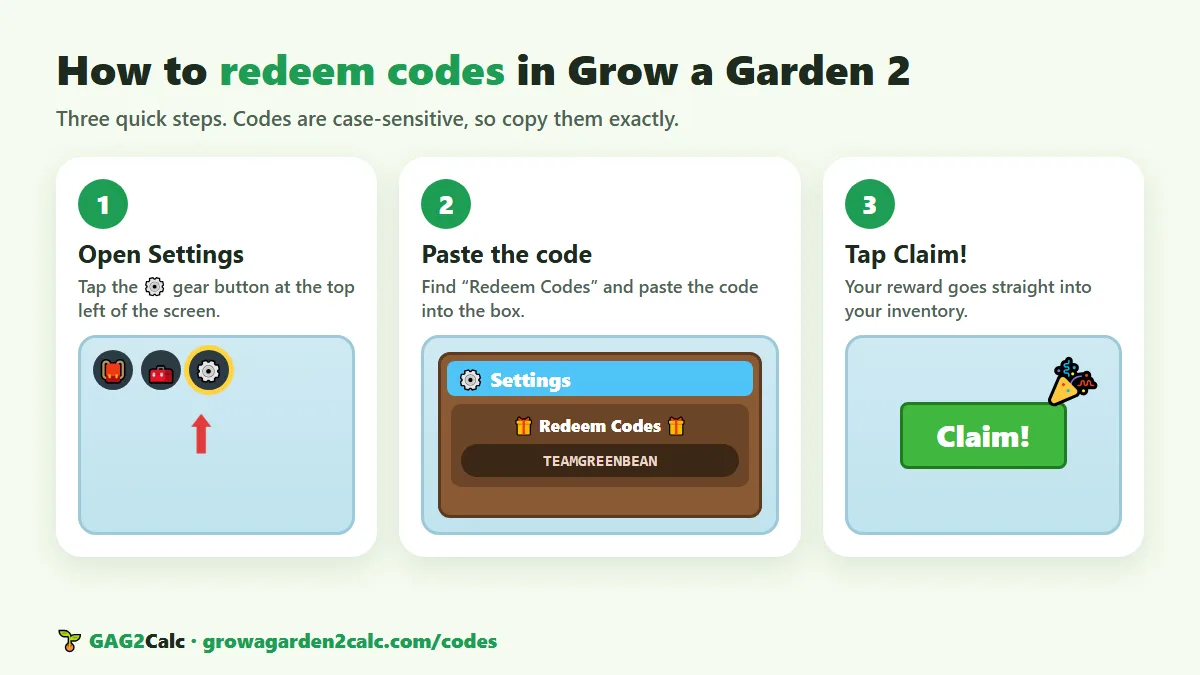
Redeeming a code takes less than a minute. Here's how:
- Start the game. Open Grow a Garden 2 on Roblox. It works on PC, phones, tablets and consoles.
- Finish the tutorial first. If you're new, play through the short tutorial. It unlocks the main buttons, including the one you need for codes.
- Open Settings. Tap the ⚙️ gear button in the top-left corner of the screen.
- Enter the code. In the Redeem Codes box (it says “Enter code here…”), paste a working code from the list above. Use our Copy button so you don't make a typo.
- Tap Claim! Your reward is added to your account straight away. Nothing happened? Check the spelling, or see why a code might not work below.
Got free seeds? Check what they are worth on the values list before you trade them, and read our beginner's guide to use them well.
Expired codes (4)
These codes no longer work. They are listed so you don't waste time trying them.
BEANORLEAVE10RDCAwardLUNARGLOW10torigate
Code not working? Here's why
If the game says a code is invalid, it is almost always one of these reasons:
- It expired. Codes don't last forever. The developers remove old codes after a while, so a code that worked last week might be gone today. Expired codes move to our list above.
- There's a typo. Codes are case-sensitive, so
TEAMGREENBEANandteamgreenbeanare different. Tap our Copy button instead of typing, and make sure there is no extra space at the start or end. - You already used it. Most codes work once per account. Claiming the same code again won't give you another reward.
- You're on an old server. Brand-new codes often arrive with an update. If a new code fails, leave and join a fresh server so you get the latest version of the game, then try again.
- It has a requirement. Some codes only work if you do something first, like inviting friends to your server. Check the note under each code above.
Still not working? Tell us which code and we'll check it.
How to find more Grow a Garden 2 codes
New codes don't come out on a fixed schedule, but they usually appear at the same moments. Here is where to look:
- Bookmark this page. We check for new and expired codes every week, so it is the quickest way to see everything in one place.
- The game's Roblox page. Developers often put new codes or update notes in the game description. Look under “Description” on the game page.
- The official Discord. Codes are usually announced there first. Join through the invite link on the game's Roblox page and turn on notifications for the announcements channel.
- Big updates and events. New codes often arrive with a new update, a seasonal event or an Admin Party.
- Player milestones. When the game hits a big number of players or likes, developers sometimes celebrate with a code. Liking and favoriting the game helps reach those goals.
The developers release codes around big updates, events and milestones. There is no fixed schedule, so check back often.
Stay safe: real codes are always free and are only entered inside the game. Never type your Roblox password on a website or into a link that promises free codes or items. Learn more in our safety guide.
Grow a Garden 2 codes FAQ
How do I redeem codes in Grow a Garden 2?
Finish the tutorial, tap the gear button in the top-left corner to open Settings, paste the code into the Redeem Codes box, and tap Claim. The reward is added to your account right away.
Why is my code not working?
Codes are case-sensitive, so type them exactly. Some codes have extra requirements, and many expire after a while. If a code on our list no longer works, please report it.
How often are new codes released?
There is no fixed schedule. New codes usually arrive with big updates, events or milestones. We check for new codes every week.
Are these codes free and safe?
Yes. Real codes are always free and are only entered inside the game. Never enter your Roblox password on a website that promises codes or free items.